
QIDI Max4 Combo Review: Large-Format, Multi-Material 3D Printing
By AValidReview. An AI-assisted summary of customer feedback, not a hands-on test.
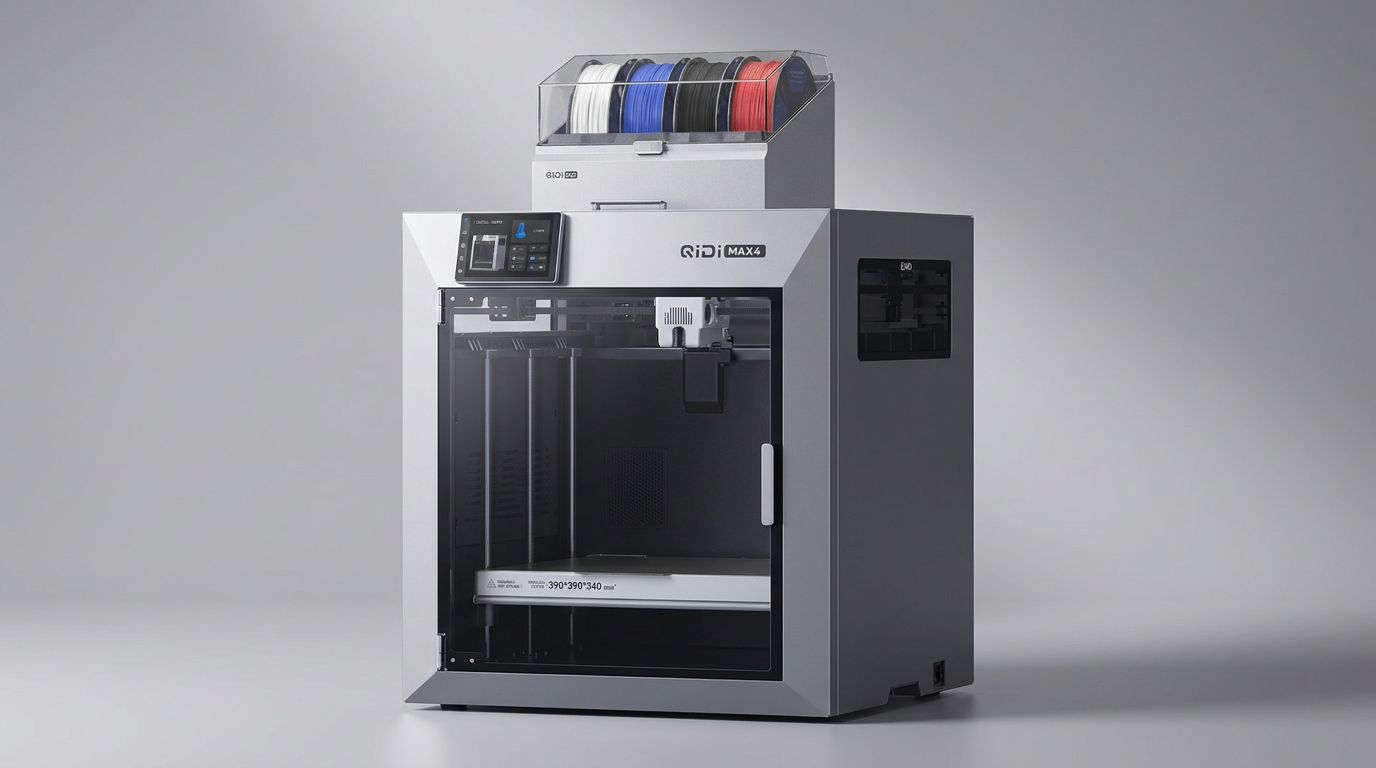
The QIDI Max4 Combo enters a competitive 3D printing market, promising an expansive build volume and multi-material capabilities. Designed to handle both standard and engineering-grade filaments, this machine aims to bridge the gap between prosumer and professional demands.
Owners report a printer that delivers on its core promises: large, high-quality prints at impressive speeds. This review consolidates feedback from real users to provide a clear, unbiased assessment of the Max4 Combo's capabilities, its ease of use, and its long-term reliability.
We examine its performance with various materials, the effectiveness of its integrated features, and the overall user experience, including setup and support interactions, to determine if this large-format printer merits its position in your workshop.
What owners love
- + Delivers exceptional print quality and precision, even on fine details.
- + Features a very large build volume suitable for industrial parts and prototypes.
- + Achieves high printing speeds without compromising output quality.
- + Handles a wide range of materials, including engineering and abrasive filaments.
- + Offers effective customer support, resolving issues promptly.
- + Easy setup process, often ready for use with minimal calibration.
Common complaints
- − QIDI Box filament management system can be noisy and prone to jams if not precisely aligned.
- − Toolhead sensor can be temperamental, requiring careful positioning to prevent false triggers.
- − Initial software/firmware issues and Wi-Fi connectivity problems are reported by some.
- − The printer is very heavy and requires at least two people to move safely.
- − Pre-print start times can be lengthy, and filament purge amounts are high with multi-color printing.
- − Some build volume is lost due to exclusion zones.
Design & Build
The QIDI Max4 Combo is a substantial machine, featuring a 390×390×340mm build volume that accommodates large parts without requiring segmentation. Its construction includes closed-loop motors on the X/Y axes and a 2mm lead screw with an anti-backlash nut on the Z-axis, indicating a focus on stability and precision. Owners frequently describe the printer as robust and well-built, often requiring two people for safe relocation due to its considerable weight. The design integrates a heated chamber, crucial for working with high-temperature materials, though the Polar Cooler system requires a separate purchase. The full-surface silicone heated bed receives praise for its even temperature distribution and reliable first-layer adhesion.
Setup & Ease of Use
Many owners report a straightforward setup process, with the printer often functioning effectively out of the box. Initial calibration is largely automated, simplifying the first-print experience. However, some users encountered initial hurdles, including Wi-Fi connectivity issues and firmware update problems that could lead to fault messages. The large touchscreen and optimized interface contribute to an intuitive operating experience. The QIDI Box, while enabling multi-color printing, can be noisy during filament changes and requires precise alignment of its filament buffer to prevent external feed jams. The toolhead sensor has also been noted as temperamental, sometimes requiring slight tilting of the machine to avoid false triggers.
Performance in Real Use
The Max4 Combo consistently delivers excellent print quality, producing detailed and precise outputs. Users highlight its capability to handle rapid printing speeds (up to 800mm/s) without sacrificing surface finish or object integrity. The high-flow hotend with a hardened steel nozzle supports a broad spectrum of materials, including PLA, PETG, ASA, ABS-CF, PC, and PPS-CF. Owners confirm its suitability for demanding applications, such as aerial drone components, where engineering filaments are routinely used. Long-term use reports suggest reliable performance over hundreds of hours, with consistent outcomes across various print jobs and materials, reaffirming its workhorse capability for both complex prototypes and routine manufacturing.
Software & Ecosystem
The printer supports both its proprietary QidiStudio slicer and third-party options like Orca Slicer. While some users initially struggled with software-related issues, those who resolved them found the QidiStudio app effective, offering direct network printing and often cleaner results compared to alternative slicers. The integrated AI camera automatically detects certain printing failures, like spaghetti-like anomalies, pausing the print to conserve material. The QIDI Box expands functionality by enabling up to 16-color printing and multi-material capabilities, alongside intelligent filament management, including real-time monitoring and automatic pause on run-out. However, the multi-color printing process can generate high filament purge amounts, a common characteristic of such systems.
Value & Reliability
The QIDI Max4 Combo presents what many owners consider a strong value proposition, particularly for its large format, multi-material capabilities, and ability to handle engineering filaments effectively. Priced well north of $1000, it offers features commonly found in more expensive industrial machines. Reliability is a recurring theme, with many users reporting minimal issues, even after extensive operational hours. Customer support receives consistent praise for being responsive and knowledgeable, often assisting users in resolving setup or operational difficulties. While some initial teething issues are reported, the overall consensus points to a robust, high-performing printer that reliably produces quality results, making it a solid investment for its target audience.
Verdict
Strong Buy - This printer offers substantial capabilities for its cost, delivering high-quality, large-format prints with diverse materials.
This printer is an excellent choice for experienced users, professionals, or dedicated enthusiasts who require a large build volume, multi-material capabilities, and the ability to work with engineering-grade filaments. Individuals transitioning from smaller or less capable machines will find its robust performance and consistent output to be a significant upgrade. The effective customer support also makes it a viable option for those who might encounter initial setup complexities.
However, novices to 3D printing may find the size and initial software quirks challenging. Those with limited space, a tight budget under $1000, or no need for large-scale, multi-material, or high-temperature filament printing might consider more compact or less feature-rich alternatives.
FAQ
More 3D Printers reviews
Bambu Lab AMS lite Review: The Multi-Color Upgrade Dilemma
AOSEED AI 3D Printer for Kids Review: Capable Fun

Anycubic Kobra S1 ACE 2 Pro Combo Review: Enclosed Multicolor Value

FLASHFORGE AD5M Pro Review: High Speed Enclosure on a Budget

FLASHFORGE Creator 5 Pro Review: Multi-Toolhead Utility

QIDI Q2 3D Printer Review: High-Temp Power at a Consumer Price
This review is based on real experiences shared by owners in online communities.