
Entina Tina2C Review: The Mini 3D Printer for Young Builders
By AValidReview. An AI-assisted summary of customer feedback, not a hands-on test.
The 3D printing landscape is often bifurcated: hobbyist machines demanding extensive tinkering, and industrial solutions priced out of reach for most. The Entina Tina2C, however, carves out a distinct niche that challenges this paradigm, positioning itself not just as a beginner's printer, but as a gateway device for younger users and their families. This isn't a scaled-down enthusiast model; it is purpose-built for an audience prioritizing immediate gratification and guided exploration over deep technical dives. It suggests a future where 3D printing is as accessible as a desktop inkjet.
While many entry-level printers promise simplicity, the Tina2C delivers a genuinely plug-and-play experience that resonates with its target demographic. Owners consistently highlight its out-of-box functionality and the minimal barriers to first print. This focus on frictionless entry, facilitated by its compact form factor and dedicated app, makes it less of a complex tool and more of an appliance. It leverages the “App-First Advantage,” a design philosophy that funnels complex controls into a familiar mobile interface, reducing cognitive load for new users.
This approach has implications beyond just ease of use; it dictates print size, material compatibility, and ultimately, its role in the broader 3D printing ecosystem. Understanding the Tina2C means acknowledging these deliberate design choices and evaluating its performance within this specific, yet growing, segment of the market.
What owners love
- + Exceptionally easy setup and operation, ideal for beginners and children
- + Compact and quiet design, suitable for home or classroom environments
- + App and WiFi control simplify model selection and printing
- + Auto-leveling and flexible build plate enhance print success
- + Strong community and customer support reported by some users
Common complaints
- − Limited print volume restricts project size
- − Lacks a heated bed, limiting material options to PLA and flexible filaments like TPU
- − Inadequate part cooling fan for optimal print quality on certain geometries
- − Power supply cable and switch placement can be inconvenient
- − Some long-term reliability concerns with power components reported
Design & Build
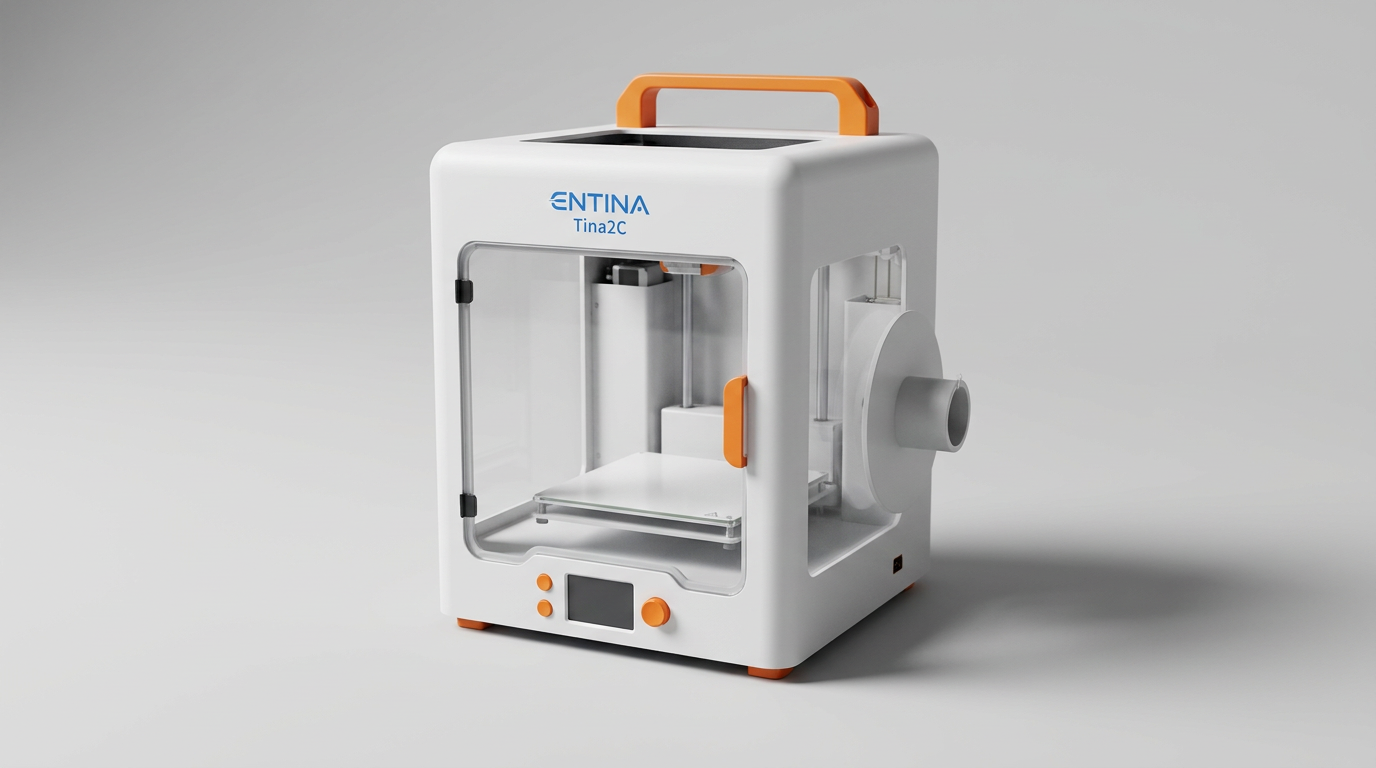
The Tina2C presents a compact, enclosed design that immediately communicates its target audience. Its smooth, rounded edges and covered print volume contribute to its 'toy-like' aesthetic, which is a deliberate choice for safety and integration into a home or classroom setting. Owners frequently commend its small footprint, making it easy to place on a desk without significant intrusion. The integrated LED lighting is a practical touch, illuminating the print area without harsh glare, a thoughtful detail for visual learning.
Constructively, the printer uses a magnetic, flexible build plate, a feature widely praised for simplifying print removal a critical aspect for new users. The overall build quality is generally regarded as robust for its price point, with some owners noting it feels more premium than anticipated. However, the design does exhibit what we might call 'the cable compromise': the power and USB connections are positioned on the upper right side, which can create awkward cable routing. Furthermore, the power switch integrated into the cable itself, rather than the unit, can be less convenient for powering on and off, requiring users to locate and manipulate the cable rather than a fixed button on the device.
Setup & Ease of Use
The Entina Tina2C’s primary objective is to eliminate setup friction, and owners overwhelmingly confirm its success. Several accounts describe being able to print within minutes of unboxing, a testament to its fully assembled nature and auto-leveling feature. The guided setup, often via the accompanying Poloprint Cloud app, streamlines what can be a daunting process for newcomers.
This printer excels in what we term "The Eight-Minute Promise" where a beginner can initiate their first print almost immediately. The user experience is designed around accessibility; the most challenging part of initial setup, according to one owner, was simply feeding the filament. This focus on immediate gratification makes it an excellent tool for engaging younger users and those with no prior 3D printing experience. The app-driven workflow, allowing model selection and print initiation from a smartphone, significantly lowers the barrier to entry, moving 3D printing closer to a consumer appliance experience rather than a specialized manufacturing tool. Even without the app, owners find it straightforward to use via TF card.
Performance in Real Use
For its intended purpose and print volume, the Tina2C delivers commendable print quality. Owners frequently express satisfaction with the output, especially for small objects and educational projects. Precision is generally noted as good, considering the price. However, the printer operates under certain inherent limitations stemming from its design choices. The absence of a heated print bed restricts material options primarily to PLA and some flexible filaments like TPU; PETG is not recommended due to adhesion issues.
Another recurring theme among more experienced users is the 'cooling fan deficit.' The single fan is dedicated to cooling the hot end, with some airflow diverted to cool the printed layers. Owners report this setup is often insufficient for rapid layer cooling, which can impact print quality, particularly on overhangs or complex geometries. While workarounds like external fan modifications exist, this represents a trade-off for its simplified design. The low-noise operation is a significant benefit for home and classroom use, allowing prints to run without disruption. Power-loss recovery is a valuable feature, preventing wasted filament and time on longer prints.
Software & Ecosystem
The Tina2C leverages a robust software ecosystem centered around the Poloprint Cloud app, providing a user-friendly interface for model selection and print management. Owners appreciate the extensive library of 3000+ models and the convenience of WiFi printing directly from the app. This approach introduces an 'App-Assisted Learning Curve,' wherein users learn fundamental 3D printing concepts through an intuitive, curated experience rather than through complex slicer settings.
For users seeking more control, the Tina2C maintains compatibility with industry-standard slicing software like Cura and Simplify3D, allowing for deeper customization and learning. This dual approach - a simple app for beginners and advanced software compatibility for growth - offers flexibility. However, some users encountered minor file naming quirks when printing via SD card, noting that periods in filenames could cause printing issues. The AI Creativity and STEM learning modules integrated into the app reinforce its educational value, aligning with its positioning as a tool for creative exploration rather than just production.
Value & Reliability
Priced around $200, the Entina Tina2C represents strong value, especially as a first 3D printer for families or educational settings. Owners consistently highlight its "ready-to-go" nature and the enjoyment it brings, particularly to younger users. The initial investment is low enough to mitigate the risk associated with exploring a new hobby.
Reliability is generally positive, with many users reporting consistent performance over an extended period. However, some long-term owners have noted specific issues. Power supply failures, particularly concerning the inline power switch, represent a recurring, albeit not widespread, point of concern. One owner reported a power supply failure after several months, necessitating a replacement. While support was prompt in addressing this, it flags a potential area for long-term durability. This reveals a 'first-layer fragility' in the power chain, where a single component can undermine an otherwise robust user experience. For most, the educational and creative return on investment significantly outweighs these isolated reliability concerns, particularly given the product's price point.
Verdict
Buy - This printer offers exceptional ease of use and value for its target audience.
The Entina Tina2C is an excellent choice for first-time 3D printer owners, children, and educational environments. Its simple setup, app-driven workflow, and automatic features remove common barriers to entry. If your primary goal is to introduce yourself or a family member to 3D printing without a significant time investment in learning complex software or hardware, and your projects are primarily small, this printer delivers. It excels as a 'gateway device' into the world of additive manufacturing.
However, users seeking a machine for larger prints, requiring a wider range of filament compatibility (beyond PLA and TPU), or desiring fine-grained control over advanced print settings may find its limitations restrictive. More experienced hobbyists or those with ambitions for functional, multi-material prints might consider models in the $300-$500 range. This product is a poor fit for power users who would quickly outgrow its confined print volume and lack of a heated bed.
The Tina2C's true innovation lies in its role as an "experience enabler." It's not merely a printer; it's a carefully curated introduction to 3D creation that prioritizes engagement over advanced technical specifications. By distilling the 3D printing process to its most accessible form, it redefines what an entry-level machine can be, quietly expanding the market for a technology once deemed niche and complex.
FAQ
More 3D Printers reviews
ugee Funbox 3D Printer Review: Safe Household Making
Original Prusa CORE One+ Kit Review: The Maker's CoreXY
ANYCUBIC Photon P1 Max Review: Scale Meets Detail
Anycubic Kobra S1 ACE 2 Pro Combo 3D Printer Review
Toybox Alpha Two 3D Printer Review: The Zero-Fuss Toy Factory
Creality K2 SE 4C Review: Budget Multicolor CoreXY
This review is based on real experiences shared by owners in online communities.