
ELEGOO Centauri Carbon Review: High-Speed 3D Printing for Beginners
By AValidReview. An AI-assisted summary of customer feedback, not a hands-on test.
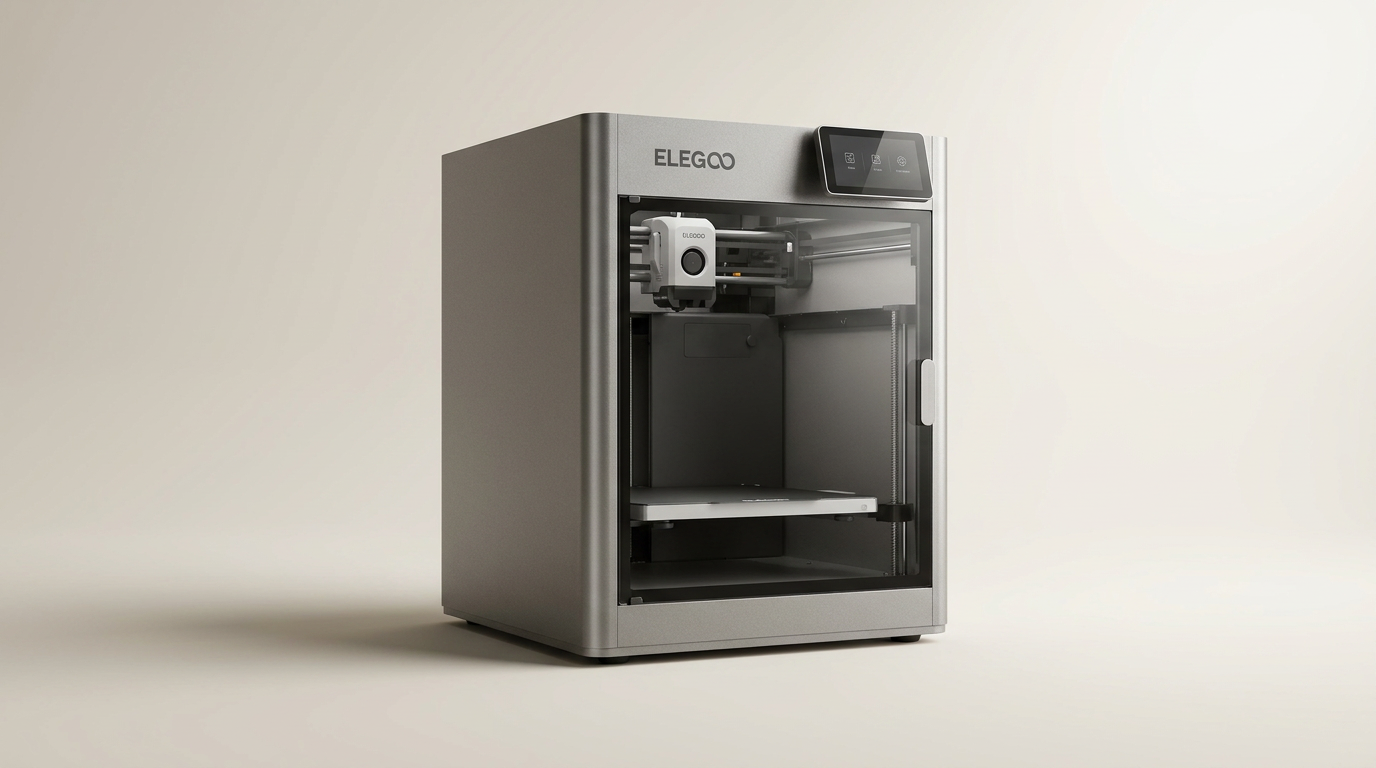
The ELEGOO Centauri Carbon 3D printer enters a competitive market, promising high-speed performance and broad material compatibility in an accessible package. Positioned for both novices and experienced users, this CoreXY machine aims to simplify the 3D printing process with its out-of-the-box readiness.
Historically, 3D printing often involved extensive calibration and troubleshooting. The Centauri Carbon addresses these pain points, integrating features designed to minimize user intervention and maximize time spent printing rather than configuring. This review evaluates its performance against those claims, drawing from the experiences of owners.
We examine its design, ease of setup, real-world printing performance, software integration, overall value, and long-term reliability to determine if the Centauri Carbon lives up to its promise as a high-speed, user-friendly 3D printer.
What owners love
- + Prints reliably and quickly, often cited as a significant upgrade from older models.
- + Remarkably easy setup, with many users printing within an hour of unboxing.
- + Enclosed design and high-temperature nozzle support advanced filaments like carbon fiber.
- + Consistent and high-quality prints, even at high speeds.
- + Integrated camera and remote monitoring enhance user convenience.
- + Strong value proposition for a CoreXY printer in its price bracket.
Common complaints
- − Chamber cooling fan generates considerable noise during operation.
- − Filament path from an external dry box makes material changes cumbersome.
- − Firmware updates reportedly cause Wi-Fi issues for some users.
- − Replacement extruder cutter blades are difficult to source.
- − Some internal components utilize plastic, despite a sturdy metal exterior.
Design & Build
The Centauri Carbon features a robust, integrated die-cast aluminum frame, designed to provide stability and minimize vibrations during high-speed operation. Owners confirm this contributes to consistent print quality. While the exterior often consists of metal, some internal components, such as functional parts, are reportedly plastic. The printer includes dual LED lighting within its enclosed chamber, which enhances visibility. However, one common complaint mentions the chamber cooling/circulation fan produces significant noise during prints. The build plate offers dual surfaces, with one optimized for PLA, a feature owners appreciate after an initial learning curve. The filament input, however, could be more accommodating for users employing external dry boxes.
Setup & Ease of Use
A prominent advantage of the Centauri Carbon is its out-of-the-box readiness. Many owners, including complete novices, report an exceptionally straightforward setup process, often completing it and initiating a first print within an hour. This involves removing packaging, attaching the filament holder, and running automated calibration routines guided by the touchscreen interface. The auto-leveling function contributes to reliable first layers, minimizing the common frustration of bed adhesion. For those new to 3D printing, the intuitive controls and pre-calibration simplify the initial learning curve, making it accessible for beginners. The printer performs self-checks and calibrates automatically, delivering a hassle-free start.
Performance in Real Use
The Centauri Carbon consistently delivers on its promise of high-speed, high-quality printing. Owners migrating from older, less advanced printers frequently highlight the substantial reduction in print times without sacrificing output quality. The CoreXY structure facilitates speeds up to 500 mm/s and 20000 mm/s² acceleration, producing smooth finishes and tight layer lines. The 320°C hardened steel nozzle and enclosed chamber enable printing with advanced filaments like carbon fiber reinforced materials, expanding potential applications. The upgraded dual-sided build plate offers reliable adhesion for various materials. Owners report successful prints with PLA, PETG, TPU, ABS, ASA, and PLA-CF, praising the machine's versatility. Even with prolonged usage, many users report consistent performance without major hardware issues.
Software & Ecosystem
The Centauri Carbon includes a pre-installed slicer, which owners find straightforward for basic operations. Many users opt for alternative slicers like Orca Slicer, compatible with the printer, to access more advanced options. The built-in chamber camera provides real-time monitoring and allows for time-lapse recording, enhancing remote print management. Wi-Fi connectivity enables remote adjustments. However, some users report that attempted firmware updates can disable Wi-Fi functionality. The software generally contributes to a streamlined workflow, though users may need to consult online resources or YouTube for in-depth settings and maintenance guidance.
Value & Reliability
Owners frequently praise the Centauri Carbon as an exceptional value, especially considering its price point, which typically falls around $300-$400. Many compare its performance favorably to more expensive machines. Its reliability is consistently noted, with users reporting hundreds or thousands of print hours without significant issues. While one owner experienced initial problems requiring a unit replacement, ELEGOO's customer support facilitated the process, ultimately resulting in a high-performing product. The printer's stable operation and robust feature set, including high-speed capabilities, material versatility, and a rigid frame, underscore its strong value proposition for both new and experienced users seeking a dependable, enclosed CoreXY printer.
Verdict
Strong Buy - This printer offers exceptional value and performance for its price, making advanced 3D printing accessible.
This printer is an excellent choice for first-time 3D printer owners and experienced hobbyists alike who prioritize ease of use, high-speed printing, and advanced material compatibility without spending well north of $500. Its out-of-the-box readiness, robust build, and consistent print quality provide an experience typically found in higher-priced machines in the $500-$800 range. If you need a reliable workhorse for various filaments and appreciate minimal setup, this machine delivers.
However, those who require silent operation or frequently use an external dry box for filament changes might consider other options. Users heavily reliant on manufacturer-provided firmware updates should exercise caution, as some have reported Wi-Fi issues post-update. If these specific concerns outweigh the significant benefits and value, alternatives exist, but often at a higher cost.
FAQ
More 3D Printers reviews

Anycubic Kobra S1 ACE 2 Pro Combo Review: Enclosed Multicolor Value

FLASHFORGE AD5M Pro Review: High Speed Enclosure on a Budget

FLASHFORGE Creator 5 Pro Review: Multi-Toolhead Utility

QIDI Q2 3D Printer Review: High-Temp Power at a Consumer Price
Flashforge Adventurer 5M Smooth PC Plate Review

FLASHFORGE Creator 5 Pro Review: Multi-Toolhead Efficiency
This review is based on real experiences shared by owners in online communities.