
Creality K2 SE 3D Printer Review: Fast Prints, Easy Experience
By AValidReview. An AI-assisted summary of customer feedback, not a hands-on test.
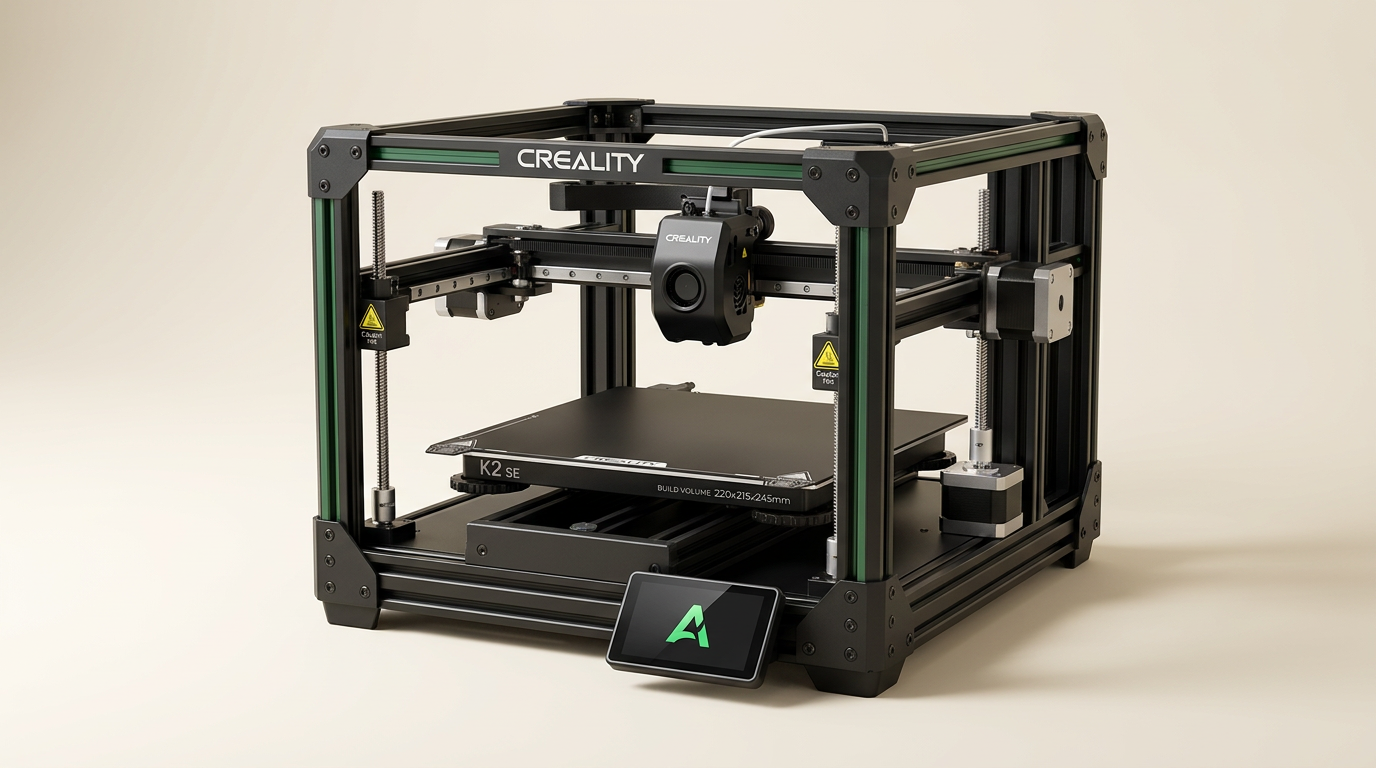
The Creality K2 SE 3D printer targets both novices and experienced users seeking rapid fabrication and a simplified workflow. Positioning itself as an upgrade over previous Creality models, it emphasizes high-speed printing capabilities, a robust metal construction, and features designed for user-friendliness, such as automatic leveling and a direct drive extruder. Its compatibility with Creality's multi-color system (CFS) also suggests an expandability path for more complex projects.
With a stated print speed of 500mm/s and a build volume of 220x215x245mm, the K2 SE aims to deliver efficient production without sacrificing print quality. This review examines whether the K2 SE lives up to these claims, analyzing owner experiences regarding its setup, day-to-day performance, print quality, software integration, and overall value in the moderately priced 3D printer market.
What owners love
- + Rapid out-of-box setup and integration for new users
- + High print speeds reduce project completion times
- + Reliable automatic bed leveling ensures consistent first layers
- + Good print quality, especially for a fast printer
- + Wireless connectivity and app control enhance convenience
- + Expandable for multi-color printing with optional CFS system
Common complaints
- − Voltage switch location can cause initial setup issues
- − Can be loud at full operating speeds
- − Connectivity to PC for direct printing can be unclear
- − Occasional build plate adhesion issues reported over time
- − Slicer settings may require user calibration for optimal results
Design & Build
The Creality K2 SE features a solid metal build, primarily from die-cast aluminum alloy, corner gussets, and dual-side crossbeams. This construction provides significant rigidity, which contributes to stability during high-speed movements and maintains dimensional accuracy. Owners frequently describe the machine as sturdy. While some users acknowledge its compact footprint compared to larger Core-XY printers, the overall fit, and finish receive positive remarks, indicating a well-assembled and visually appealing unit. The inclusion of a quick-swap nozzle and a direct drive extruder with hardened steel gears also contributes to the printer's functional design.
Setup & Ease of Use
User feedback consistently highlights the K2 SE's simplified setup. Many owners report being able to unbox and start printing within minutes, often under five. The fully automatic bed leveling system receives particular praise for eliminating manual adjustments, improving first-layer success rates, and simplifying the initial calibration process. This feature addresses a common pain point for both new and experienced users, making the printer accessible for those with zero prior 3D printing experience. However, a recurring issue mentioned by some owners is a hidden voltage switch inside the machine, which, if not correctly set for the region (e.g., 110V vs. 220V), can lead to initial power-on failures. Once resolved, the setup process generally proceeds smoothly, guided by a touchscreen Quick Guide.
Performance in Real Use
The K2 SE delivers on its promise of high-speed printing, with users consistently noting its ability to complete prints significantly faster than older models. Owners report excellent print quality for a fast machine, with smooth surfaces and minimal layer lines, even for intricate models. The direct drive extruder effectively handles various filament types, including flexible materials. The automatic leveling system also contributes to reliability, with many users experiencing successful first layers consistently. However, some owners describe the printer as loud at its highest speeds, suggesting that its operational noise might be a factor for placement in shared living or work spaces. One long-term user mentioned occasional issues with small prints not adhering to the build plate after about a month of use, indicating a potential need for build plate maintenance or replacement.
Software & Ecosystem
The K2 SE leverages Creality OS, Creality Print slicer, and Creality Cloud for a comprehensive ecosystem. Owners appreciate the convenience of wireless connectivity, remote control via a mobile app or PC, and the ability to transfer files without physical media. Creality Print is generally well-received for its optimized slicing capabilities and filament presets. While some users find the default slicer adequate, others note its similarity to Orca Slicer, allowing for familiar workflows. The printer's compatibility with the Creality CFS multi-color system (sold separately) offers a clear upgrade path for users interested in multi-material projects, providing features like automatic filament identification and tangle detection. Some advanced users also mention the possibility of rooting the printer to use full Klipper versions or third-party interfaces like Mainsail, though this may void the warranty.
Value & Reliability
Owners generally perceive the Creality K2 SE as offering strong value, particularly for its speed, ease of use, and print quality within its price segment. Many consider it a significant upgrade from older models, justifying the investment for those seeking a more streamlined and reliable printing experience. The machine's reliability is often highlighted; several users report continuous operation for months with minimal issues, provided regular maintenance is performed. One owner did experience a breakdown due to a wire detaching from the heat coil and noted excessive glue on the motherboard connections during a self-repair attempt, suggesting occasional manufacturing inconsistencies. However, overall sentiment points towards a robust and dependable printer that performs consistently with proper care.
Verdict
Buy - The Creality K2 SE offers an excellent balance of speed, user-friendliness, and print quality for its price point.
This printer is an ideal choice for beginners seeking an accessible entry into 3D printing, as well as for experienced users tired of manual calibration and slow print times. Its auto-leveling, direct drive system, and high-speed capabilities make it a workhorse for functional parts, prototypes, and decorative items. Those who plan to eventually experiment with multi-color prints will also appreciate the expandability with the optional CFS system.
Conversely, users who prioritize extremely quiet operation or require advanced features not stock on a printer in the mid-hundreds range, without any tinkering, might consider alternatives. Additionally, those who are not comfortable troubleshooting minor technical issues, such as locating an internal voltage switch, might find the initial setup more challenging than anticipated.
FAQ
More 3D Printers reviews

Anycubic Kobra S1 ACE 2 Pro Combo Review: Enclosed Multicolor Value

FLASHFORGE AD5M Pro Review: High Speed Enclosure on a Budget

FLASHFORGE Creator 5 Pro Review: Multi-Toolhead Utility

QIDI Q2 3D Printer Review: High-Temp Power at a Consumer Price
Flashforge Adventurer 5M Smooth PC Plate Review

FLASHFORGE Creator 5 Pro Review: Multi-Toolhead Efficiency
This review is based on real experiences shared by owners in online communities.