
Creality K2 Pro Combo: A Powerful, High-Speed 3D Printer for Advanced Users
By AValidReview. An AI-assisted summary of customer feedback, not a hands-on test.
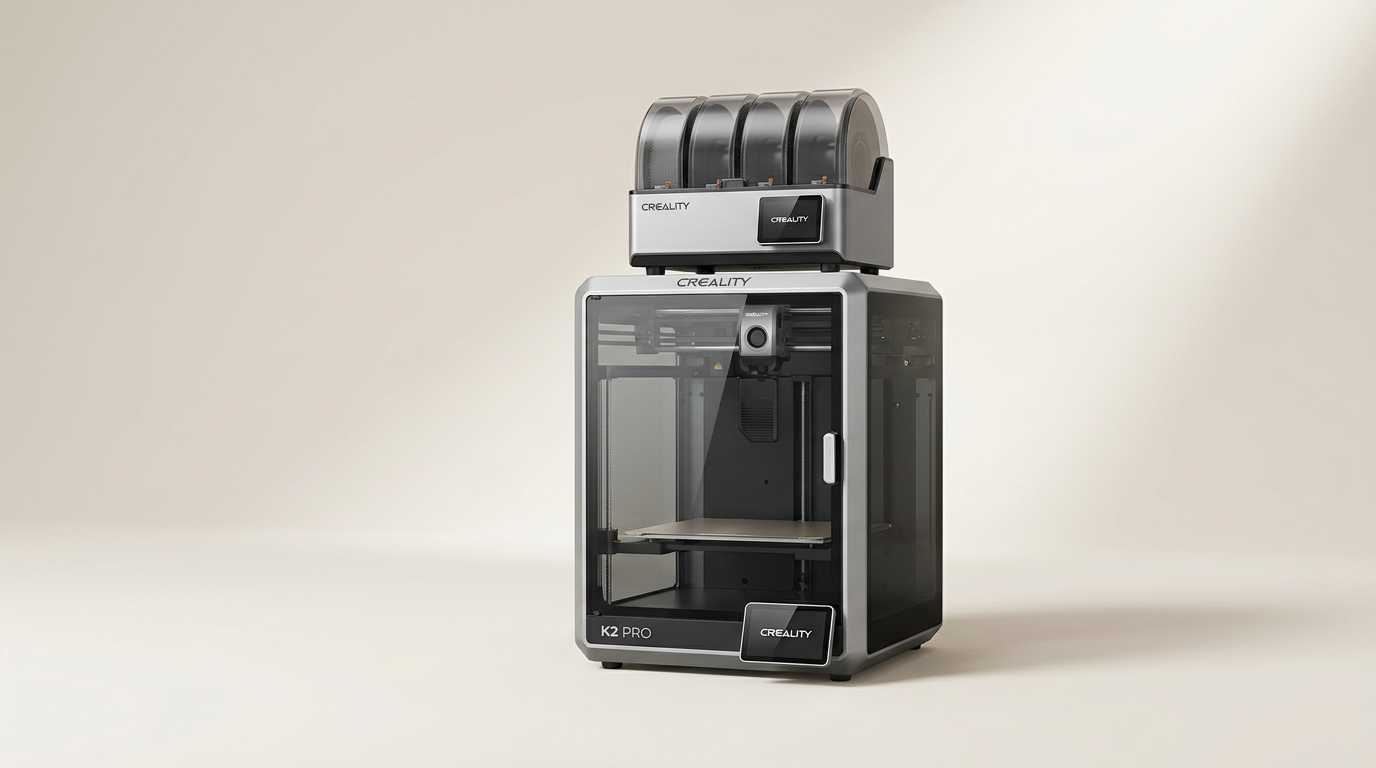
The Creality K2 Pro Combo positions itself as a robust solution for demanding 3D printing tasks, offering a substantial 300x300x300mm build volume, multi-color capabilities via its CFS Smart Filament System, and print speeds up to 600mm/s. Features like active chamber heating and dual AI cameras aim to enhance precision and monitoring.
This review evaluates the K2 Pro Combo based on comprehensive user feedback, focusing on its real-world performance, ease of use, and overall reliability. We examine whether its advanced features translate into a genuinely improved printing experience for both enthusiasts and professionals.
While marketed for its speed and advanced functionality, user experiences reveal common themes around setup, day-to-day operation, and the impact of its proprietary software. The K2 Pro, along with its CFS system, aims to streamline complex prints, but its effectiveness depends on how well these integrated systems function for end-users.
What owners love
- + High print speeds significantly reduce production time
- + Large build volume accommodates big projects and batch printing
- + Effective auto-leveling and Z-offset simplify setup
- + Active chamber heating improves print reliability for advanced materials
- + Multi-color printing with CFS enables complex designs
- + Enclosed design reduces noise and contains odors
Common complaints
- − Filament changing can be inconvenient
- − Stock slicer software (Creality Print) is considered basic
- − Some units exhibit manufacturing defects or early component failures
- − Wireless connectivity issues occasionally reported
- − No dedicated storage for included tools
Design & Build
The Creality K2 Pro Combo presents a fully enclosed CoreXY design, contributing to reduced noise levels and stable temperature control crucial for materials like ABS and ASA. Owners appreciate the robust feel and precise construction, noting its compact footprint relative to the print volume. The included CFS Smart Filament System is integrated for multi-color and multi-material printing, enhancing functional and aesthetic possibilities. While the overall build quality receives praise, some users mention minor design oversights, such as the lack of dedicated storage for tools, contrasting with other Creality models.
Setup & Ease of Use
Many users report a straightforward unboxing and initial setup process. The K2 Pro's auto-leveling and automatic Z-offset capabilities are highlighted as significant improvements, streamlining first-layer adhesion and calibration. The manufacturer's guiding videos and detailed packaging contribute positively to the experience. However, the initial setup can involve firmware updates and calibrations, which, if not executed precisely, can lead to early issues. While the printer promotes ease of use, particularly for beginners transitioning from simpler machines, some operational aspects, like filament changes, are less convenient compared to other models.
Performance in Real Use
The K2 Pro consistently delivers on its promise of high-speed printing, with noticeable reductions in print times compared to conventional FDM printers. The 600mm/s print speed and 20,000mm/s² acceleration are frequently cited as transformative. Print quality remains high, even at elevated speeds, a testament to the FOC step-servo motors and linear rails. The active heated chamber proves effective for printing warp-prone materials, and the dual AI cameras provide useful monitoring and flow rate optimization. The CFS system generally performs as expected for multi-color prints. However, a minority of owners encountered persistent issues, such as mid-print failures at consistent heights, which remained unresolved even after extensive troubleshooting and component replacement, indicating potential quality control inconsistencies in some units.
Software & Ecosystem
The K2 Pro runs on Creality OS and supports popular slicers like Creality Print, Cura, and others. Connectivity options include WiFi and LAN, enabling remote monitoring and OTA updates. Owners appreciate the open-source nature of Creality products, allowing for greater customization and access to root passwords. However, Creality Print, the primary slicer, is often described as basic compared to alternatives. Wireless connectivity issues, including random disconnections requiring factory resets, are occasional complaints. The integrated AI features, such as print failure detection and time-lapse filming, generally add value to the printing workflow.
Value & Reliability
Positioned in the higher end of the consumer 3D printer market, around the $800-$900 range, the K2 Pro offers significant features for its price point. For users upgrading from entry-level machines, the K2 Pro represents a substantial improvement in speed, build volume, and material compatibility. Many find it a worthwhile investment due to its efficiency and advanced capabilities. Reliability reports are generally positive, with many users experiencing consistent performance over several months. However, a notable number of feedback instances concern issues such as frequent part breakdowns, unresolved printing errors, and slow customer support response, which introduce concerns about long-term reliability and after-sales service for a subset of owners. The value proposition is strong for those seeking speed and multi-material printing, provided individual units perform as intended.
Verdict
Buy - The Creality K2 Pro Combo delivers exceptional speed and advanced features for its price, significantly improving workflow for complex prints.
This printer is an excellent choice for experienced users ready to upgrade from slower, less capable machines or for ambitious beginners seeking a robust, future-proof device. Its high-speed capabilities, large build volume, multi-color support via CFS, and active chamber heating make it suitable for professional applications or large-scale personal projects. Users comfortable with navigating potential software quirks and performing basic maintenance will find substantial value in its performance, especially given its price point, which sits well under $1000. It effectively handles challenging filaments and accelerates print production.
However, those who prioritize absolute plug-and-play simplicity and consistent, flawless operation without any troubleshooting should consider alternatives. While many users report excellent reliability, a segment of feedback indicates potential quality control inconsistencies and difficulties with customer support for resolving serious, recurring issues. Users who require dedicated tool storage or prefer a highly refined, feature-rich native slicer experience might also find minor frustrations.
FAQ
More 3D Printers reviews

Anycubic Kobra S1 ACE 2 Pro Combo Review: Enclosed Multicolor Value

FLASHFORGE AD5M Pro Review: High Speed Enclosure on a Budget

FLASHFORGE Creator 5 Pro Review: Multi-Toolhead Utility

QIDI Q2 3D Printer Review: High-Temp Power at a Consumer Price
Flashforge Adventurer 5M Smooth PC Plate Review

FLASHFORGE Creator 5 Pro Review: Multi-Toolhead Efficiency
This review is based on real experiences shared by owners in online communities.