
SCRIB3D PRO Review: A Versatile Tool for Creative Professionals
By AValidReview. An AI-assisted summary of customer feedback, not a hands-on test.
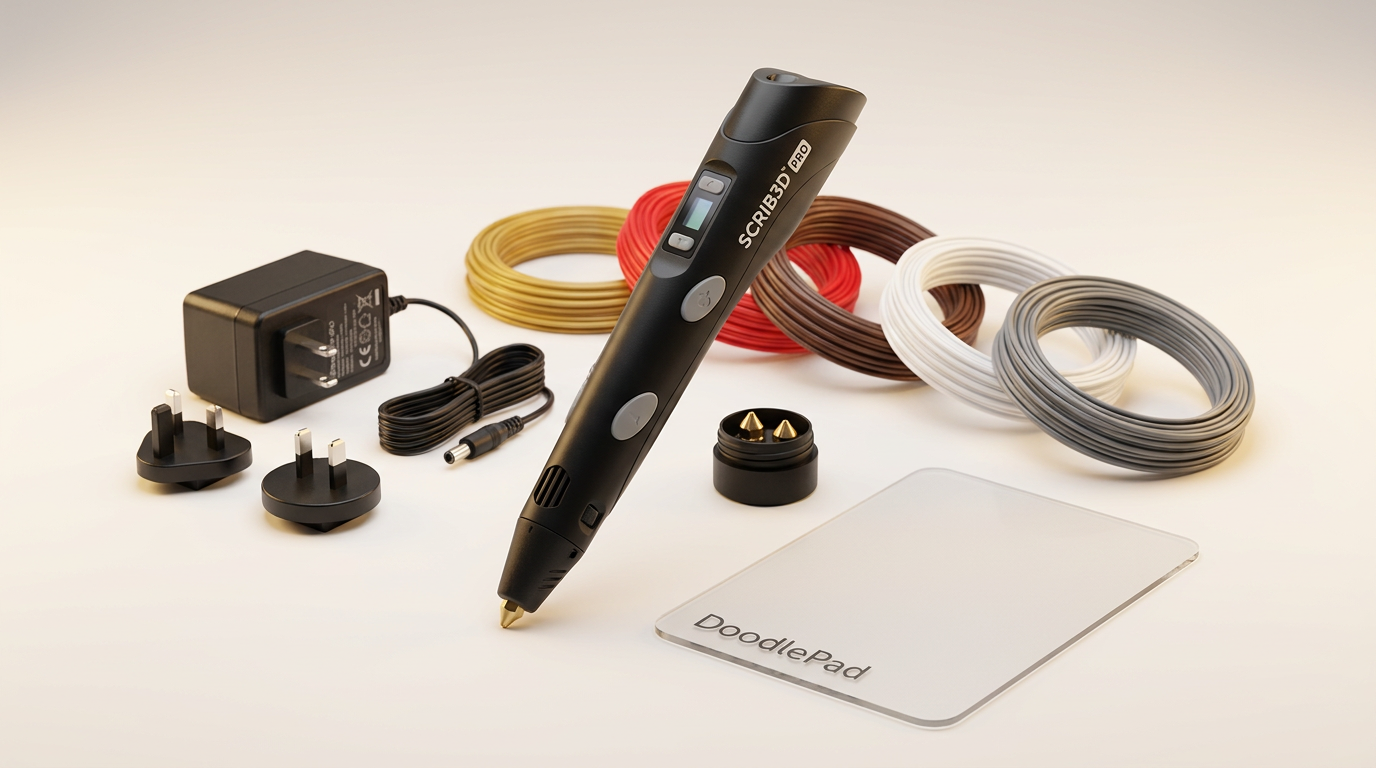
The SCRIB3D PRO 3D Printing Pen enters a market often characterized by entry-level novelty, yet it aims for a different segment: the creative professional. While many 3D pens position themselves as toys, the PRO model targets designers, engineers, and serious hobbyists with promises of precision and broad material compatibility. This isn't just about drawing in three dimensions; it's about adding a portable, intuitive tool to a professional's creative arsenal, bridging the gap between digital design and physical iteration.
However, the professional claim warrants scrutiny. Does the SCRIB3D PRO deliver on its promise of enabling serious making, or does it merely offer incremental improvements over its more consumer-oriented peers? The core challenge for any high-end 3D pen lies in transitioning from a conceptual curiosity to a genuinely productive instrument. This review examines whether the SCRIB3D PRO earns its 'Pro' designation, focusing on its ability to integrate into established workflows and provide consistent, reliable results for its intended audience.
The minimal feedback from owners suggests a competent, user-friendly device, but the real test is how it performs under the demands of intricate design work. This review will delve into whether its advanced features translate into tangible benefits for prototyping, detailing, and creative exploration, or if it succumbs to what we'll call the 'desktop bottleneck' - where the pen's utility is ultimately limited by the inherent constraints of freehand 3D drawing.
What owners love
- + High material versatility for diverse projects
- + Reported as easy to use
- + Sleek and professional design
- + Provides precise control over temperature and speed
- + Supports standard 1.75 mm filament spools
Common complaints
- − Limited owner feedback for long-term assessment
- − Potential for hand fatigue during extended use
- − No explicit mention of an auto-retraction feature for filament
- − Professional claims outpace documented owner experience
- − Requires adherence to heat safety warnings
Design & Build
The SCRIB3D PRO presents a design that aims for professional aesthetics, described by one owner as 'sleek.' Its ergonomic body and intelligent button layout are intended to minimize hand fatigue, a critical factor for extended creative sessions. The clear on-pen display provides real-time temperature and speed feedback, enhancing user control. This attention to functional ergonomics suggests an understanding of the demands placed on creative professionals. However, the true measure of its build quality will come with more extensive use, as even a well-designed pen can develop issues with repeated thermal cycling or physical stress. The absence of widespread feedback on durability makes it difficult to assess its long-term resilience, leaving what we term the 'endurance question' unanswered.
Setup & Ease of Use
Owners report the SCRIB3D PRO is 'easy to use,' indicating a straightforward setup and operational process. The device's compatibility with widely available 1.75 mm filament spools simplifies material sourcing, removing a common barrier to entry for new users. The adjustable temperature and speed settings, coupled with the clear display, provide immediate control without requiring complex menus. This 'plug-and-play' approach is vital for creative professionals who prioritize efficiency over a steep learning curve. While the initial experience appears smooth, the depth of its ease of use will depend on how intuitively users can switch between different material profiles and fine-tune settings for specific detailing tasks.
Performance in Real Use
The SCRIB3D PRO promises 'maximum control' through adjustable temperature and speed settings, allowing for fine detail and cleaner lines. Its broad material support, including PLA, PHA, Wood, Bronze/Copper, Steel, Vibers, and CF 10, is a significant differentiator. This versatility allows users to experiment with diverse textures and properties, moving beyond basic plastic models. Owners note its 'versatility,' reinforcing this capability. The ability to prototype with different materials can be a major asset for designers, enabling rapid iteration and material testing. However, the ultimate performance hinges on the user's skill and patience; even with advanced controls, freehand 3D printing introduces inherent challenges in achieving perfect geometries. The pen addresses the technical aspects of material handling, but it cannot eliminate the 'human precision gap' inherent in its operational model.
Software & Ecosystem
As a standalone tool, the SCRIB3D PRO operates without an external software suite, relying entirely on its on-board controls and display. This design choice emphasizes immediate, tangible interaction rather than digital integration. While this simplifies the user experience, it also means the pen exists somewhat in isolation from common CAD or 3D modeling pipelines. Its 'ecosystem' is primarily defined by the breadth of compatible 1.75 mm filaments and physical accessories like the DoodlePad. For professionals, this lack of software connectivity represents a 'workflow island' situation. It functions as an excellent hands-on detailing or repair tool, but it does not natively integrate with the digital design environments where initial concepts are often formed. Its value lies in complementing digital tools, not replacing them, specifically for the physical refinement stage.
Value & Reliability
Positioned around $200, the SCRIB3D PRO aims to justify its price with professional features like extensive material compatibility and precise controls. The 'works just fine' feedback suggests basic functional reliability, but the limited owner reports make a comprehensive assessment of long-term reliability challenging. For a tool targeted at 'serious making,' consistency and durability are paramount. The pen's value proposition is strong if its broad material support and fine control reliably translate into productive output over time. However, without more extensive user data, the long-term 'cost of ownership' - including potential maintenance or wear on nozzles with abrasive materials - remains an open question. The included specialty materials and interchangeable nozzles add initial value, but future costs for replacements or specific exotic filaments should be considered.
Verdict
Consider - The SCRIB3D PRO offers intriguing professional-level features, but requires more comprehensive long-term validation.
This pen is a compelling option for designers, engineers, and advanced hobbyists seeking a highly versatile 3D pen for prototyping, detailing, and material experimentation. Its wide material compatibility and precise controls cater to users who need more than basic PLA drawing. Individuals working in adjacent fields like jewelry making or scale modeling, who benefit from fine detail work and diverse material finishes, will find its capabilities attractive. Those already familiar with 3D printing and looking for a portable, tactile supplement to their workflow should also consider it.
Conversely, casual users or those new to 3D printing seeking a simple, low-cost entry point might find its feature set overkill and its price point around $200 too high. Beginners primarily interested in artistic freehand drawing may find less expensive options suffice. Individuals prioritizing fully integrated digital workflows over hands-on tactile creation should also look elsewhere.
The SCRIB3D PRO represents a nuanced proposition in the 3D pen market. It excels in its ambition to transcend the 'toy' category, but its true 'Pro' standing remains subject to the 'longevity premium' - the expectation that a tool built for professionals will endure rigorous use and consistently deliver on its advanced promises over time. Its success ultimately depends on whether its innovative features translate into sustained productivity rather than just initial excitement.
FAQ
More 3D Printing Pens reviews

ScontLuy 3D Relief Art Pen Review: Popcorn Craft Flop
Clkklpm 3D Magic Popcorn Pens Review: Faulty Heat-Activated Art
Topacme 3D Relief Art Pen Review: Magic Popcorn Pens Tested
Barods Popcorn Pens Review: Novelty Craft Failure
LTGEM 3D Printing Pen Hard Case Review
co2CREA Storage Case for 3D Printing Pen Review
This review is based on real experiences shared by owners in online communities.