
Revopoint MetroY Pro Review: Industrial Accuracy Meets Hobbyist Headaches
By AValidReview. An AI-assisted summary of customer feedback, not a hands-on test.
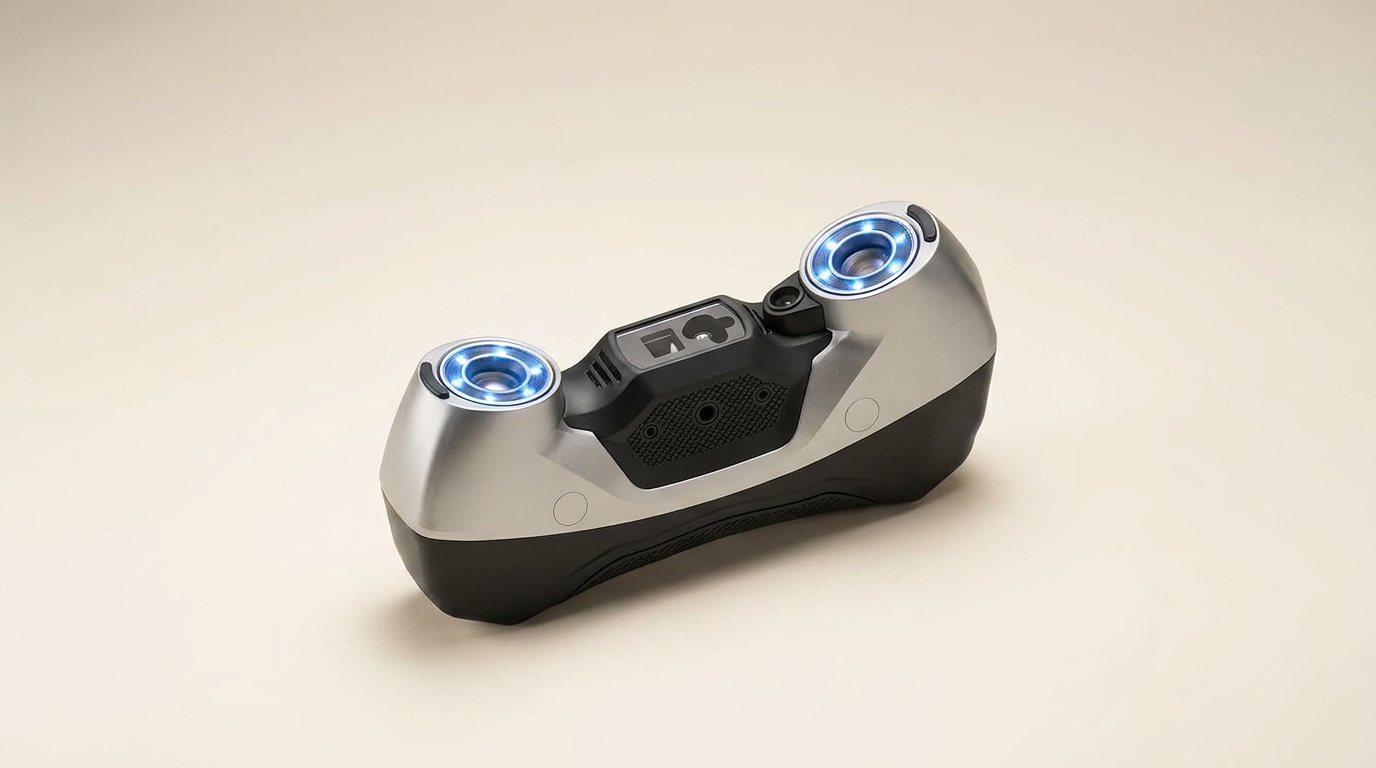
The Revopoint MetroY Pro enters the 3D scanning landscape touting industrial-grade precision and a suite of advanced scanning modes, including a 62-line full-field blue light system. On paper, it represents a significant leap for prosumer and small business applications, promising the ability to capture intricate details on difficult surfaces without scanning sprays or markers. This ambition positions it as a potential bridge between accessible, entry-level scanners and specialized, far more expensive metrology equipment.
However, the reality of implementing such technology often reveals a tension between hardware capability and software maturity. While the MetroY Pro delivers on its core promise of accuracy and speed, owner feedback consistently highlights a critical dependency on system integration and a high 'user technique tax' to unlock its full potential. The advertised convenience of wireless operation and broad compatibility faces friction in daily use, suggesting a product still maturing in its ecosystem support.
Our analysis reveals a device that offers compelling performance for those with specific, demanding scanning needs and the technical patience to navigate its current limitations. It is not a turnkey solution for every aspiring 3D artist or engineer, but rather a powerful tool that demands an investment beyond its purchase price in both computing power and user expertise.
What owners love
- + Delivers exceptional accuracy and detail capture, rivaling more expensive units
- + High scanning speed, efficiently capturing complex objects
- + Effective at scanning dark and shiny surfaces without spray in many cases
- + Wireless connectivity enhances operational flexibility
- + Bundled auto turntable simplifies small object scanning
- + Mac software support has improved, expanding compatibility
Common complaints
- − Significant software and firmware stability issues, especially on Mac
- − Requires a very powerful PC; resource demands are substantial
- − Wireless operation can introduce networking conflicts, especially without internet
- − Proprietary software ecosystem (Revo Design, Revo Measure) adds recurring cost
- − Instructional gaps; users must often rely on community knowledge for advanced techniques
- − Not truly wireless; still requires a wired power connection
Design & Build
The MetroY Pro presents a robust and well-finished physical design. Owners generally praise its build quality and inclusion of accessories like the auto turntable, noting a premium feel out of the box. The unit's form factor is conducive to handheld operation, and the integration of a dual-axis turntable is a distinct advantage for automated scanning of smaller components. However, a recurring point of clarification from users concerns its 'wireless' nature. While data transmission can occur wirelessly via Wi-Fi 6, the device still requires a wired power connection, either from an outlet or an included battery grip. This creates a conceptual gap between marketing and lived experience, as some users anticipate a completely untethered operation. The absence of a dedicated power button also draws comment, requiring users to disconnect the power cord directly, which introduces a minor friction point in workflow.
Setup & Ease of Use
Initial setup of the MetroY Pro is described as straightforward by many, often facilitated by Revopoint's provided instructions. However, the path to generating high-quality scans frequently involves a steep learning curve, what we term the 'Scanning Craft Barrier'. Several owners report a lack of comprehensive guidance on advanced scanning techniques, optimal mode selection for specific objects, or when scanning spray might still be beneficial despite marketing claims. This necessitates extensive experimentation, reliance on online communities, or prior experience to master. The wireless connectivity, while offering flexibility, sometimes creates its own set of challenges, particularly the inability to simultaneously scan wirelessly and maintain an internet connection on the host PC, which disrupts common workflows. Firmware updates are occasionally necessary to resolve initial difficulties, indicating an evolving product state rather than a perfectly polished out-of-box experience.
Performance in Real Use
When operated within its optimal parameters, the MetroY Pro delivers on its promise of high accuracy and impressive detail. Many users attest to its ability to capture fine textures and complex geometries, even on challenging surfaces like leather, with precision down to a few thousandths of an inch. Scanning speeds are a particular highlight, with owners reporting rapid data acquisition at high frame rates, significantly reducing the time spent on physical scanning. The 62-line full-field blue light mode is frequently cited for its effectiveness in marker-free scanning of feature-rich objects. However, this high performance comes with a notable hardware cost: the 'Processor Consumption Tax'. Owners consistently emphasize the necessity of a powerful computer, often specifying a minimum of 32GB RAM and a high-end GPU, to handle the massive datasets and computational demands, especially during scan merging and processing. Overheating has also been reported by a few long-term users, particularly in warmer environments, leading to performance degradation and poor scan quality.
Software & Ecosystem
The MetroY Pro's software experience is a point of significant divergence among users. The bundled Revo Metro software is generally seen as functional for basic scanning and meshing, with improvements noted in Mac compatibility. However, a consistent and strong undercurrent of feedback points to software instability, including frequent crashes and memory leaks, even on high-spec machines. A critical limitation for many professional users is the fragmented nature of Revopoint's ecosystem. While Revo Metro handles scanning, essential post-processing tools like Revo Design and Revo Measure are separate, paid subscriptions and are Windows-only, limiting the Mac user experience. The promised compatibility with professional platforms like Quicksurface and Geomagic Control exists, but leveraging them often requires workarounds or additional software purchases. Furthermore, the Mac experience is particularly troubled, with owners reporting issues with wireless functionality, Rosetta 2 emulation, and crashes, despite recent updates. This creates a 'Platform Parity Gap' where the advertised cross-platform support does not translate into an equivalent user experience across operating systems, especially for advanced features.
Value & Reliability
At its price point, the MetroY Pro occupies a middle ground, offering capabilities that exceed many entry-level scanners while remaining more accessible than high-end industrial metrology systems. Several owners consider it a strong value, especially given the included accessories and raw scanning performance. However, the reliability of the overall system is impacted by the software's maturity and demanding hardware requirements. The 'hidden cost' of ongoing software subscriptions for Revo Design/Measure and the necessity of a robust workstation can quickly escalate the total investment. Longevity reports are mixed, with some long-term users experiencing issues like overheating after several months, while others praise its sustained performance. Customer support responsiveness receives mixed reviews, with some reporting proactive assistance, while others describe challenges in resolving complex issues like hardware replacements or software bugs. This suggests that while the hardware is capable, the complete product experience, including software and long-term support, requires further refinement.
Verdict
Consider - The Revopoint MetroY Pro offers compelling hardware capabilities for high-precision 3D scanning, but its software ecosystem and demanding requirements introduce notable friction.
This scanner is best suited for experienced hobbyists, prosumers, or small businesses engaged in specific, high-precision scanning tasks like reverse engineering or quality control where detail accuracy is paramount. Buyers must possess a powerful Windows PC, a willingness to invest time in learning advanced scanning techniques, and potentially absorb additional software subscription costs. Its wireless capabilities offer convenience, but users should be prepared for potential network conflicts and the reality that it is not fully untethered.
Skip the MetroY Pro if you are a casual user seeking a plug-and-play experience, a Mac-primary user expecting full software feature parity, or if you lack a robust computing setup. Its ‘Software Integration Debt’ means that despite impressive hardware, the path to consistent, high-quality output is often paved with troubleshooting and compromise, making it a powerful tool for the patient and technically proficient, rather than a universally accessible solution.
FAQ
More 3D Scanners reviews
Revopoint POP 4 Magnetic Outdoor Filter Review
3DMakerpro Moose Lite Premium 3D Scanner Review
3DMakerpro Seal Lite Review: Precision at a Strict Distance
3DMakerpro 6mm 3D Scanning Marker Dots Review
Creality Scan Bridge for CR-Scan Otter Review: Wireless Freedom
Creality Otter Lite 3D Scanner Review: High Precision with a Catch
This review is based on real experiences shared by owners in online communities.