
Creality Scan Bridge for CR-Scan Otter Review: Wireless Freedom
By AValidReview. An AI-assisted summary of customer feedback, not a hands-on test.
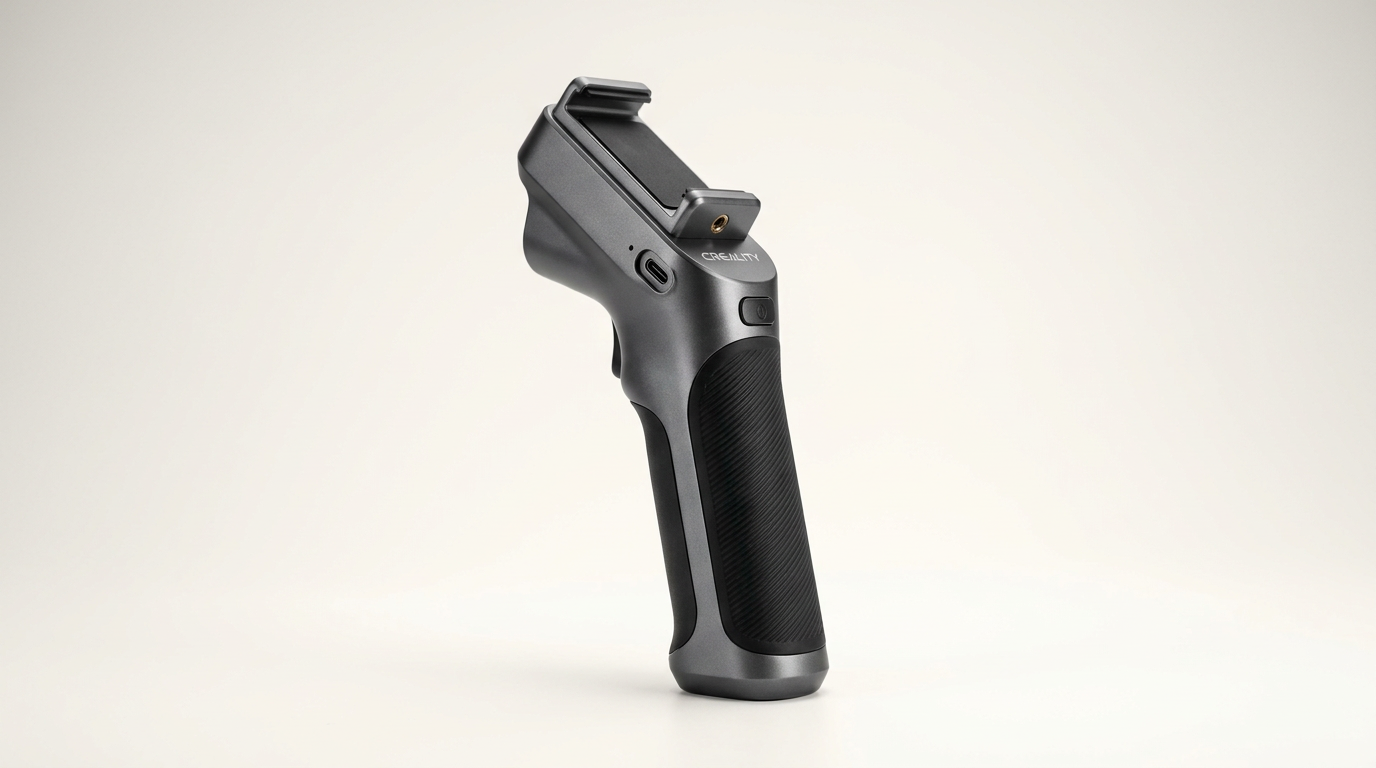
Handheld 3D scanning has long suffered from what we call the tether penalty. An optical scanner is nominally portable, but in practice, you are tethered by a thick USB umbilical to a heavy laptop that you must balance on an arm, a rolling cart, or a precarious folding table. The Creality Scan Bridge is designed specifically to eliminate that friction for the CR-Scan Otter, converting a cord-bound desktop peripheral into an autonomous field capture rig.
On paper, the value proposition is hard to dispute. By packaging an onboard battery, high-bandwidth Wi-Fi 6 transmission, and mobile screen mirroring into a compact handle assembly, Creality aims to untether the scanning workflow entirely. It targets field technicians, automotive hobbyists, and digital archivists who need to circle real-world objects without tripping over cables or risking a dropped workstation.
Yet the lived reality of the Scan Bridge reveals an ongoing tension in Creality hardware. While the mechanical and electrical engineering solves legitimate field problems, the device demands what we term the handshake tax: an unforgiving network pairing sequence and patchy companion software that can stall a shoot before the first frame is captured.
What owners love
- + Eliminates cumbersome laptop cables during field and outdoor scans
- + Substantial onboard battery life handles extended scanning sessions
- + Wi-Fi 6 connectivity delivers smooth frame rates once linked
- + Compact form factor integrates neatly with the CR-Scan Otter body
Common complaints
- − Frustrating and error-prone Wi-Fi and QR-code pairing process
- − Magnetic smartphone holder is prone to accidental dislodging
- − Sparse, unhelpful official documentation and troubleshooting
- − Mobile app reliability lags significantly behind the desktop software
Design & Build
The Scan Bridge attaches directly to the CR-Scan Otter, producing a consolidated, battery-powered scanning wand. Structurally, the casing feels sturdy enough for shop environments, housing both the Wi-Fi 6 radio and an internal power cell capable of roughly four hours of continuous scanning. Charging is handled through standard USB-C, reaching an eighty percent charge in around an hour and a half, which makes top-ups between sessions practical.
The most controversial mechanical choice is the magnetic smartphone mount. Creality opted for a snap-on magnetic interface to secure your phone as a viewfinder. While this keeps the profile clean and allows rapid detachment, field use reveals what we call magnetic shear risk. When maneuvering around engine bays or contorting to capture undercarriages, a minor bump can send a modern flagship phone clattering to the floor. Owners must exercise genuine caution or augment the mount with a mechanical clamp for peace of mind.
Setup & Ease of Use
Hardware assembly takes only seconds, but software onboarding is where the experience degrades. Getting the Scan Bridge, the CR-Scan Otter, a smartphone, and a host PC to recognize each other over local networking is an exercise in trial and error. The included quick-start guide offers little operational insight, leaving users to decipher cryptic error screens on their own.
The most common failure mode is the QR-code handshake. Scanning the device pairing code via the Creality Scan mobile app frequently returns persistent errors, stranding the user before the camera feed ever initializes. While connecting the bridge directly to a Wi-Fi 6 equipped laptop is comparatively smoother, the promised phone-first mobile workflow is marred by an initial setup curve that will test the patience of non-technical operators.
Performance in Real Use
Once you clear the networking hurdles, the operational upside of the Scan Bridge is immediately tangible. In outdoor environments or around large physical subjects, working without a laptop tether fundamentally changes the ergonomics of 3D capture. You are no longer managing cable slack with one hand while aiming the optical sensor with the other, nor are you constantly checking whether your tether is about to pull a thousand-dollar computer off a workbench.
Data throughput across the Wi-Fi 6 connection is robust. High-speed transfers keep latency low enough to monitor tracking in real time, sustaining the frame rates required by both infrared and laser scanning modes. For users scanning vehicle interiors, boat hulls, or exterior architecture, the physical freedom this accessory provides is not a minor luxury; it is the difference between a one-person job and an awkward two-person operation.
Software & Ecosystem
The bridge exposes the persistent gap between Creality hardware ambitions and its software development maturity. The Creality Scan mobile app feels distinctly secondary to the desktop suite. Mobile processing constraints and interface bugs frequently crop up, making complex multi-pass scans harder to audit on a small screen than on a dedicated PC display.
Furthermore, the ecosystem lacks robust diagnostic feedback. When a connection drops or a handshake fails, the app offers little guidance on whether the fault lies in the bridge firmware, local Wi-Fi channel interference, or mobile permissions. If Creality wants the Scan Bridge to function as a dependable field appliance rather than a tinkerer accessory, it must invest heavily in simplifying multi-terminal pairing and eliminating mobile-side crashes.
Value & Reliability
Occupying a price band approaching $300, the Scan Bridge represents a significant percentage of the CR-Scan Otter initial purchase price. For that expenditure, buyers rightly expect a plug-and-play experience that mirrors modern mobile accessories. Instead, reliability is bifurcated: rock-solid battery performance and wireless bandwidth undermined by finicky connection handshakes.
For studio users who scan objects on a rotating turntable within arm-reach of a desktop workstation, this bridge represents poor value. Its utility is almost entirely indexed to mobility. If your scanning workload takes place outside a traditional workshop, the time saved by eliminating cord management can justify the cost, provided you are willing to tolerate Creality software quirks.
Verdict
Consider - Excellent hardware freedom undermined by frustrating network onboarding.
If you regularly deploy your CR-Scan Otter outdoors, around automotive projects, or in tight spatial environments where managing a tethered laptop is an active liability, the Scan Bridge is worth purchasing. Its generous battery capacity and untethered ergonomics solve genuine operational headaches, turning the Otter into a truly portable capture tool.
Studio-bound makers, turntable operators, and those with zero patience for networking troubleshooting should pass. The premium price tag approaching $300 is tough to swallow when the smartphone companion app still struggles with basic QR-code handshakes and pairing reliability.
What most buyers miss is that the Scan Bridge does not simply remove a wire; it trades physical tethering for software tethering. You gain total physical agility in the field, but you pay for it in setup friction and ecosystem immaturity every time the pairing sequence stumbles.
FAQ
More 3D Scanners reviews
Creality Otter Lite 3D Scanner Review: High Precision with a Catch
Starry 6.0mm 3D Scanner Markers Review: Reliable Tracking Dots
Creality Scan Bridge Review: Wireless Freedom at a Cost
Kingdder Magnetic 3D Scanning Marker Review
Einstar 3D Handheld Scanner Review: Pro Hardware, Strict Demands
Marspark 6mm 3D Scanning Markers Review: Smart Consumables
This review is based on real experiences shared by owners in online communities.